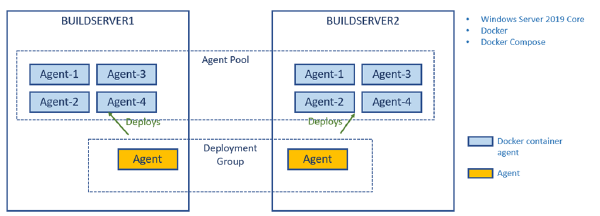
In a previous post I talked about how to create a build environment, including an Azure DevOps build agent, using Docker and Windows Containers. Using Dockerfiles, we can specify everything that we need in order to build and test our projects. Docker gives us Infrastructure as Code (no more snowflake build servers) and isolation which makes it easy to spin up multiple agents quickly on one or more machines without interfering with each other.
I’ve recently given talks at conferences and user groups on the topic of using Docker as a build engine, describing the builds using a Dockerfile. This has several advantages, such as fully consistent build no matter where you run it, no dependencies necessary except Docker.
Some things become a bit tricker though, I’ve blogged previously about how to run unit tests in a Docker build, including getting the test results out of the build container afterwards.
Having automated builds that are stable and predictable is so important in order to succeed with CI/CD. One important practice to enable this is to have a fully scriptable build environment that lets you deploy multiple, identical, build envionment hosts. This can be done by using image tooling such as Packer from HahsiCorp. Another option is to use Docker which is what I am using in this post.
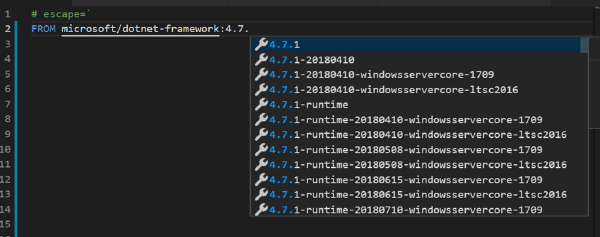
Using Docker will will crete a Dockerfile that specifies the content of the image in which builds will run. This image should contain the SDK’s and tooling necessary to build and test your projects. It will also contain the build agent for your favourite CI server that will let you spin up a new agent in seconds using the docker image.
The new build system in Team Foundation Server 2015 and Visual Studio Team Services has from the start made it very easy to integrate with GitHub. This integration allows you to create a build in TFS/VSTS that fetches the source code from a GitHub repository. I have blogged about this integration before, at http://blog.ehn.nu/2015/06/building-github-repositories-in-tfs-build-vnext/.
Publisinh a GitHubRelease from VSTS # This integration allows you to use GitHub for source code, but use the powerful build system in TFS/VSTS to run your automated builds. But, when maintaining the project at GitHub you often want to publish your releases there as well, with the output from your build.
Today Brian Harry announced that the first release of TFS 2015 Update 2 is available. It is an RC with a go-live license, which means that Microsoft will support you if you install it in production, and it will be a direct supported upgrade to RTM once it is released.
Read the full release notes for Update 2 RC1 here: https://www.visualstudio.com/en-us/news/tfs2015-update2-vs
One huge thing with the release is that Update 2 includes the new Release Management vNext feature that has up until now only been available in the service (although you can use that for on premise TFS and deployments). But now you don’t have to rely on VSTS for hosting the service, it is now part of TFS 2015 Update 2!
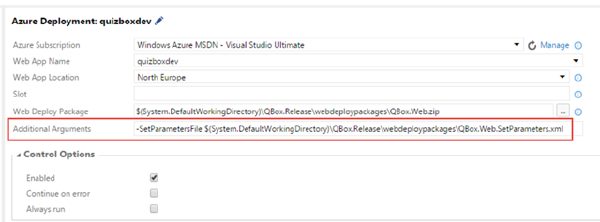
I have blogged before about how to deploy an Azure Web App using the new build system in TFS 2015/Visual Studio Team Services. In addition to configure an Azure service endpoint, it is really only a matter of using the built-in Azure Web App Deployment task.
However, in many cases I have decided not to use this task myself since it has been lacking a key feature: Applying deployment parameters using the SetParameter.xml file.
Since a couple of months back, Microsoft new Release Management service is available in public preview in Visual Studio Team Services. According to the current time plan, it will be released for on-premise TFS in the next update (Update 2).
Using a tool like release management allows you to implement a deployment pipeline by grabbing the binaries and any other artifacts from your release build, and then deploy them across different environments with the proper configuration and approval workflow. Building your binaries once and only once is a fundamental principal of implementing continuous delivery, too much can go wrong if you build your application every time you deploy it into a new environment.