This post does not really cover something new, but since I find myself explain this to people now and then, I thought that I’d write a quick post on the subject.
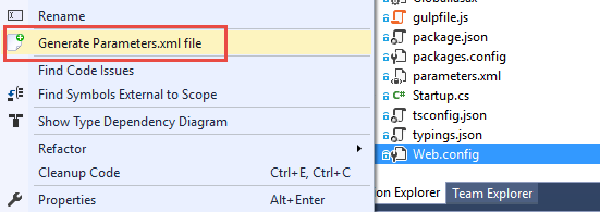
So, we want to create a web deploy package as part of our automated build, and then take this package and deploy it to multiple environments, where each environment can have different configuration settings, using VSTS Release Management. Since we only want to build our package once, we have to apply the environment specific settings at deployment time, which means we will use Web Deploy parameters.
By now, many of you should have had the chance to at least play with the new build system that was released in TFS 2015 and Visual Studio Online. Here is an introductory post I wrote about it when it entered public preview back in January.
Doing the basic stuff is very easy using the new build system, especially if you compare it with the old one, which is now referred to as XAML builds. Creating and customizing build definitions is just a matter of adding the tasks that you want to use and configure them properly, everything is done using the web interface that is part of the TFS Web Access.
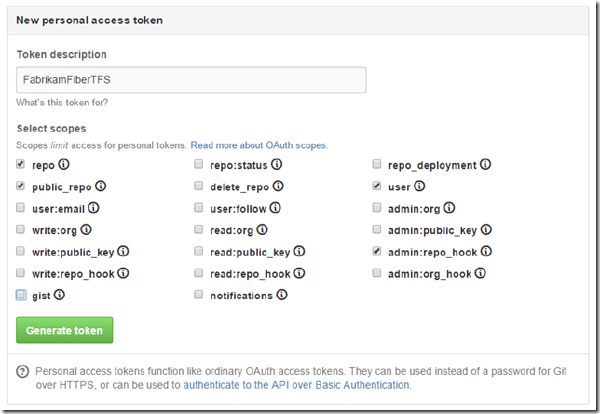
In the brave new world of Microsoft where a lot of the frameworks and languages that they build now are open sourced over at GitHub, it comes as no surprise that GitHub is nicely integrated into both Visual Studio and TFS Build vNext. This makes it very easy to setup builds that gets the source code from your GitHub repo but uses TFS Build vNext to build it. It also allows you to setup CI builds, that is builds that trigger automatically when someone does a commit in the corresponding Git repo.
TFS 2015 is around the corner, and with it comes a whole new build system. All the biggest pain points from the existing build system (now called “XAML builds”) are gone and instead we get a light weight build system with a web UI that makes it very easy to customize our build processes and that doesn’t perform a lot of magic such as redirecting your build output for example.
In this post, I will show you just how easy it is to setup a build that builds a standard ASP.NET web application, generates a web deploy package as part of the build and then pick up this package and deploys it to a Azure web site. As part of this, you will also see how smooth the integration with Azure is when it comes to connecting your subscription.
The last couple of years it has become apparent that using multiple team projects in TFS is generally a bad idea. There are of course exceptions to this, but there are a lot ot things that becomes much easier to do when you put all of your projects and team in the same team project.
Fellow ALM MVP Martin Hinshelwood has blogged about this several times, as well as other people in the community. In particular, using the backlog and portfolio management tools makes much more sense when everything is located in the same team project.
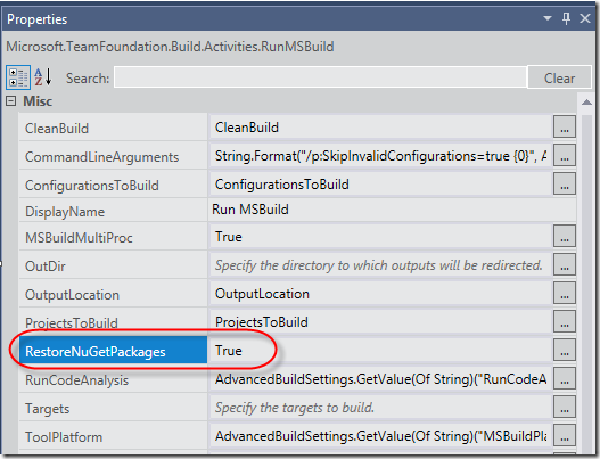
Problem # One of our customers recently had a problem with NuGet restore when they created a new build template, based on the standard TfvcTemplate.12.xaml template. In TFS 2013, package restore is done automatically by the default build templates.
It is configured as part of the RunMSBuild activity, where you can enable and disable this by setting the EnableNuGetPackageRestore property:
Almost four years ago I wrote a post on how to create a build definition programmatically using the TFS 2010 API. The code is partyl still valid, but since a lot of the information in a build definition is dependent on the build process template, the code in the blog does not work properly for the TFS 2013 default build templates. In addition, since the introduction of Git in TFS 2013, there are some other differences in how you create a build definition for a Git team project compared to a TFVC team project.
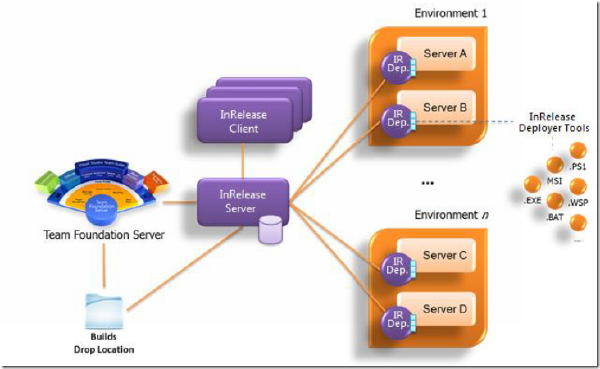
As you probably already know, Microsoft recently acquired InRelease, a release management product build by InCycle software that integrates tightly with Team Foundation Server. This acquisition fills a huge gap in the Visual Studio ALM suite, letting customers handle the release management and automatic deployment of their solution. This is a crucial feature for enabling Continuous Deployment.
In this post I will show you how to get started with using InRelease, by installing it and setting up your first release including automatic deployment to a staging server. I expect to blog some more about InRelease in the near future, looking at the nitty gritty details of release automation and deployment using InRelease.
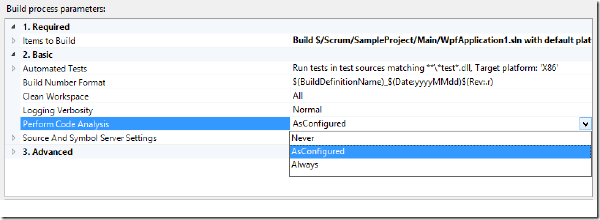
Running Static Code Analysis (SCA) is something that you should be doing regularly to verify your code base against a large set of rules that will check your code for potential problems and how it comply with standard patterns such as naming conventions for example. Microsoft include several different rule sets that you can use for starters, but you can build your own rule sets as well, that contain the rule that you want to use, In addition, you can write your own custom rules and add these to your rule sets.
TFS 2012 introduces a new type of Lab environment called Standard Environment. This allows you to setup a full Build Deploy Test (BDT) workflow that will build your application, deploy it to your target machine(s) and then run a set of tests on that server to verify the deployment. In TFS 2010, you had to use System Center Virtual Machine Manager and involve half of your IT department to get going. Now all you need is a server (virtual or physical) where you want to deploy and test your application. You don’t even have to install a test agent on the machine, TFS 2012 will do this for you!
Yesterday we pushed out a new release (August 2012) of the Community TFS Build Extension, including a new version of the Community TFS Build Manager (1.0.4.6)
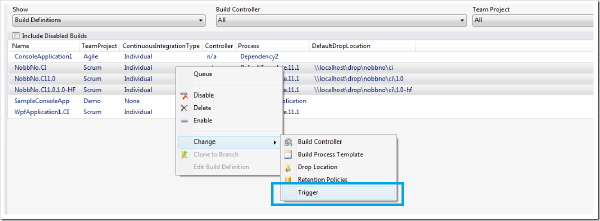
The two big new features in the Build Manager in this release are: Set Triggers It is now possible to select one or more build definitions and update the triggers for them in one simple operation: \
image You’ll note that we have started collapsing the context menu a bit, the list of commands are getting long! 🙂
I have posted before on how to implement dependency replication using TFS Build, once for TFS 2008 using MSBuild and then for TFS 2010 using Windows Workflow. The last post was not complete (I could not post all implementation details back then for various reasons), so I decided that I should post a new solution for this, but this time using the Community TFS Build Extensions library.
If it is a good idea to store your dependencies in source control or not is a question that is well debated. I’m not going to argue pros and cons here, but for those of you that want to go this way here is a build process template that will get you started.
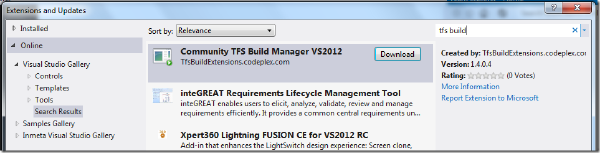
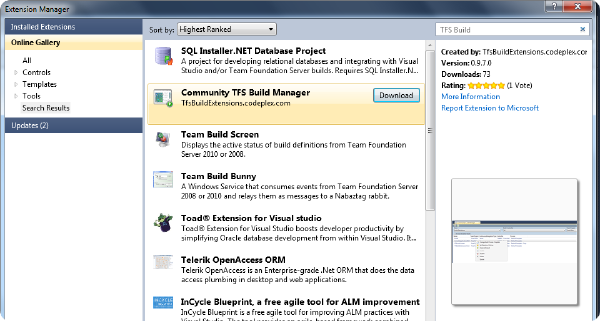
I finally got around to push out a version of the Community TFS Build Manager that is compatible with Visual Studio 2012 RC. Unfortunately I had to do this as a separate extension, it references different versions of the TFS assemblies and also some properties and methods that the 2010 version uses are now obsolete in the TFS 2012 API.
To download it, just open the Extension Manager, select Online and search for TFS Build:
As many of you probably have noticed by now, Visual Studio Database Projects are not supported in the next version of Visual Studio (currently named Visual Studio 11 Beta). When you open a solution containing a VSDB project, VS11 wants to convert it to a SQL Server Developer Tools project instead.
This project type ships with SQL Server and has a feature set that covers most of the functionality of the VSDB project, plus some new features, such a support for SQL 2012 and SQL Azure. A feature comparison list between the two project types can be found here: http://blogs.msdn.com/b/ssdt/archive/2011/11/21/sql-server-data-tools-ctp4-vs-vs2010-database-projects.aspx
We have been using TFS 2010 build for distributing a build in parallel on several agents, but where the actual compilation is done by a bunch of external tools and compilers, e.g. no MSBuild involved. We are using the ParallelTemplate.xaml template that Jim Lamb blogged about previously, which distributes each configuration to a different agent. We developed custom activities for running these external compilers and collecting the information and errors by reading standard out/error and pushing it back to the build log.
A year ago I blogged about how to manage your build process templates using the TFS API. The main reason for doing this is that you can (and should!) store your “golden” build process templates in a common location in your TFS project collection, and then add them to each team project that requires those templates. This way, you can fix a bug or add a new feature in one place and have the change affect all build definitions.
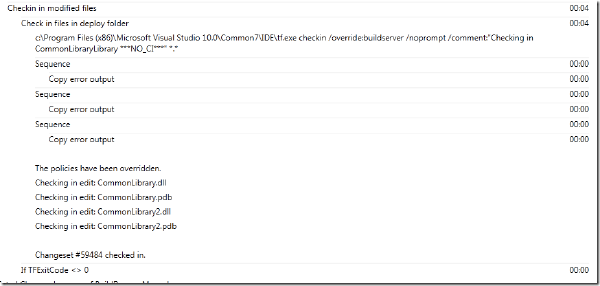
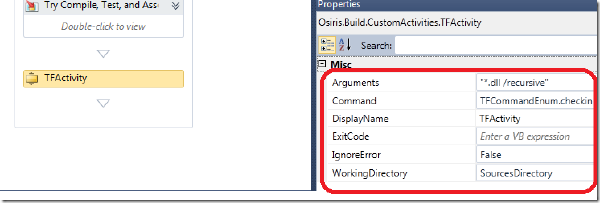
The InvokeProcess activity is very useful when it comes to running shell commands and external command line tools during a build process. When it comes to integrating with TFS source control during a build, the TF.exe command line tool can be your friend, as it lets you do most of the usual stuff such as check-in, checkout, add, modify workspaces etc.
However, it can be a bit tricky to handle the output from tf.exe, since it often produces warnings that is not necessarily a problem for your build. This is not a problem related only to tf.exe, but to all applications that produces errors and warnings on the canonical error format.
The latest release of the Community TFS Build Extensions include a brand new tool called Community TFS Build Manager and has been created for two reasons:
An implementation of the Team Foundation Build API which is referenced by the Rangers Build Customization Guidance V2 (available H1 2012) \ Provide a solution to a real problem. The Community TFS Build Manager is intended to ease the management of builds in medium to large Team Foundation Server environments, though it does provide a few features which all users may find useful. The first version of the tool has been implemented by myself and Mike Fourie. You can download the extension from the Visual Studio Gallery here: http://visualstudiogallery.msdn.microsoft.com/16bafc63-0f20-4cc3-8b67-4e25d150102c
I often use the VS 2010/TFS 2010 evaluation virtual machines that Microsoft publishes every 6 months with the latest bits. It’s a great timesaver to use an image where everything is already setup and also contains a bit of sample data that is useful when you want to demo something for customers.
There is one thing that has always been a, albeit small, but still very annoying problem and that is that the builds always partially fail when you start using the image. When you want to demo the powerful feature of associated work items in a build, you’ll find yourself with your pants down since the build fails when trying to update the associated work item! Even when looking at the historical builds for the Tailspin Toys project, you will notice that they also partially failed:
Anyone working with developing custom activities in TFS 2010 Build has run into the following dreadful error message when running the build:
TF215097: An error occurred while initializing a build for build definition TeamProjectMyBuildDefinition: Cannot create unknown type ‘{clr-namespace:[namespace];assembly=[assembly]}Activity
What the error means is that when the TFS build service loads the build process template XAML for the build definition, it can’t create an instance of the customer workflow activity that is referenced from it.
Today the first stable release of the Community TFS 2010 Build Extensions shipped on the CodePlex site. Visual Studio ALM MVP Mike Fourie (aka Mr MSBuild Extension Pack) has been the leader of this project and has done a tremendous job, both in contributing functionality as well as coordinating the work for the first release. Great work Mike! I (as well as several others) have contributed a small part of the activities, I plan to be working on the upcoming releases as well.
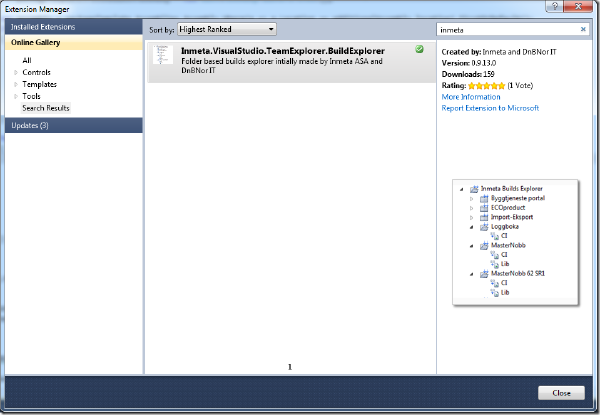
This weekend we at Inmeta release a free Visual Studio 2010 Team Explorer extensions that solves the problem with the Builds node in the Team Explorer not being hierarchic. For some reason, this part of the Team Explorer didn’t get the nice hierarchical folder structure that the Work items node got in 2010. The result is that, for a company that has several hundreds of builds in the same team project, it becomes very hard to navigate.
The build process template and custom activity described in this post is available here: http://cid-ee034c9f620cd58d.office.live.com/self.aspx/BlogSamples/Inmeta%20TFS%20Build%20Sample.zip
Running code metrics has been available since VS 2008, but only from inside the IDE. Yesterday Microsoft finally released Visual Studio Code Metrics Power Tool 10.0, a command line tool that lets you run code metrics on your applications. This means that it is now possible to perform code metrics analysis on the build server as part of your nightly/QA builds. In this post I will show how you can run the metrics command line tool from a build, and also a custom activity that reads the output and appends the results to the build log, and fails the build if the metric values exceeds certain (configurable) treshold values.
*** The sample build process template discussed in this post is available for download from here: http://cid-ee034c9f620cd58d.office.live.com/self.aspx/BlogSamples/ILMerge.xaml ***
In my previous post I talked about library builds that we use to build and replicate dependencies between applications in TFS. This is typically used for common libraries and tools that several other application need to reference.
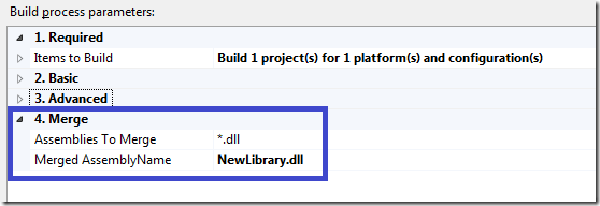
When the libraries grow in size over time, so does the number of assemblies. So all solutions that uses the common library must reference all the necessary assemblies that they need, and if we for example do a refactoring and extract some code into a new assembly, all the clients must update their references to reflect these changes, otherwise it won’t compile.
Some time ago, I wrote a post about how to implement dependency replication using TFS 2008 Build. We use this for Library builds, where we set up a build definition for a common library, and have the build check the resulting assemblies back into source control. The folder is then branched to the applications that need to reference the common library. See the above post for more details.
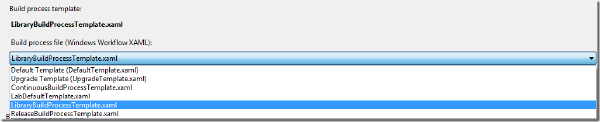
Of course, we have reimplemented this feature in TFS 2010 Build, which results in a much nicer experience for the developer who wants to setup a new library build. Here is how it looks: There is a separate build process template for library builds registered in all team projects \
Update 15.03.2014 - Fixed broken link to download
*** The custom activity is availabe for download here: https://onedrive.live.com/redir?resid=EE034C9F620CD58D%21168 ***
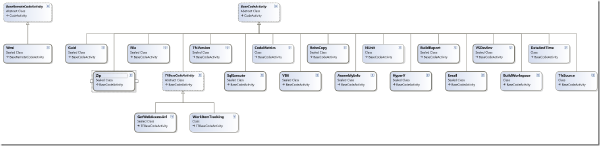
Often when creating different types of release builds (e.g. where you build something that should be installed or consumed by other applications) there is a need to check in the results of the build back to source control. A common build type for us at Inmeta is Library Builds, which we use for common libraries that are shared among several applications. We have created a special build process template for this scenario that handles versioning, copying of the resulting binaries to a pre-defined folder, optionally merges the assemblies using ILMerge, and finally checking that binaries back to TFS as part of the build.
One of the great new features in TFS 2010 Build was the ability to define Build Process Templates that can be reused across build definitions. The Build Process Template file itself is a Windows Workflow 4.0 xaml file and can be stored anywhere in source control. When a developer creates a new build definition in Team Explorer, he can choose from a list of Build Process Templates:
image
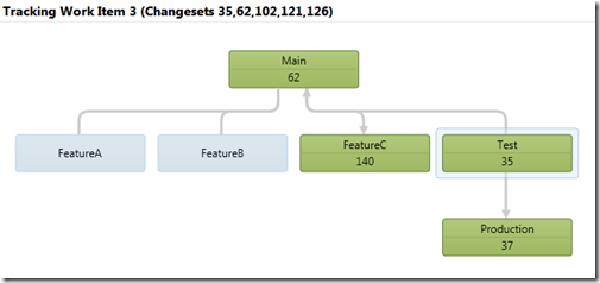
In TFS 2010, branching and merging have been greatly improved with support for branch visualization and tracking of changesets and work items across branches. A simple example of this looks like this: \
image image Here we track Work Item nr 3 which was originally resovled in the Test branch (with changeset 35). We can also see that the work item has been merged into the Production branch (as changeset 37), back to Main (62) and finally to FeatureC (140). If we switch to the Timeline view, we get a nice view of the order of these merges, together with the dates.
In TFS 2010, I have been asked this question several times: I have a build setup with tests and (possibly) code coverage, but in the build summary report it only shows No Test Results and No Code Coverage Results
What’s more interesting is that when I log in and view the build, I can see the test results!
This does of course imply that it is a one of those annoying security issues, and of course it is. To be able to see test results you must have the View Test Runs permission, which can be assigned/revoked at the security group level per team project:
By default, TFS Team Build creates a new folder in the drop location for every build. I have seen request from people that wonder how to always have team build put the output in the same folder every time, effectively overwriting the results from the last build. This is easy to accomplish by adding an activity that copies the drop folder to a fixed location.
To copy the result of the build to a fixed location, you need to modify the build process template:
Recently I’ve come across this error a couple of times when running builds that exeucte unit tests using Test containers:
API restriction: The assembly ‘file:///C:Buildsmyassembly.dll’ has already loaded from a different location. It cannot be loaded from a new location within the same appdomain.
Every time I’ve got this error, the project has been a web application, and the path to the assembly points down to the _PublishedWebsites directory that is created beneath the Binaries folder during a team build.
UPDATE: 2010-09-15 – Added details about the use of the ExitCode variable
One of the most common complaints from people starting to use Team Build is that is doesn’t support building Microsoft’s own Setup and Deployment project (*.vdproj). When creating a default build definition that compiles a solution containing a setup project, you’ll get the following warning:
The project file “MyProject.vdproj” is not supported by MSBuild and cannot be built.
I still see people complaining about the long time it takes to load test results from a TFS build in Visual Studio. And they make a valid point, it does take a very long time to load the test results, even for a small number of tests. The reason for this is that the test results is not just the result of the test run but also all the binaries that were part of the test run. This often also means that the debug symbols (*.pdb) will be downloaded to your local machine. This reason for this behaviour is that it letsyou re-run the tests locally.
When upgrading from TFS 2008 to TFS 2010, all builds are “upgraded” in the sense that a build definition with the same name is created, and it uses the UpgradeTemplate build process template to execute the build. This template basically just runs MSBuild on the existing TFSBuild.proj file. The build definition contains a property called ConfigurationFolderPath that points to the TFSBuild.proj file.
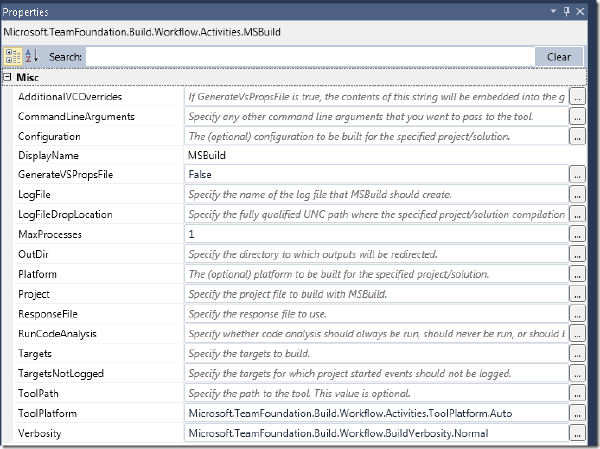
So, existing builds will run just fine after upgrade. But what if you want to use the new workflow functionality in TFS 2010 Build, but still have a lot of MSBuild scripts that maybe call custom MSBuild tasks that you don’t have the time to rewrite? Then one option is to keep these MSBuild scrips and call them from a TFS 2010 Build workflow. This can be done using the MSBuild workflow activity that is avaiable in the toolbox in the Team Foundation Build Activities section:
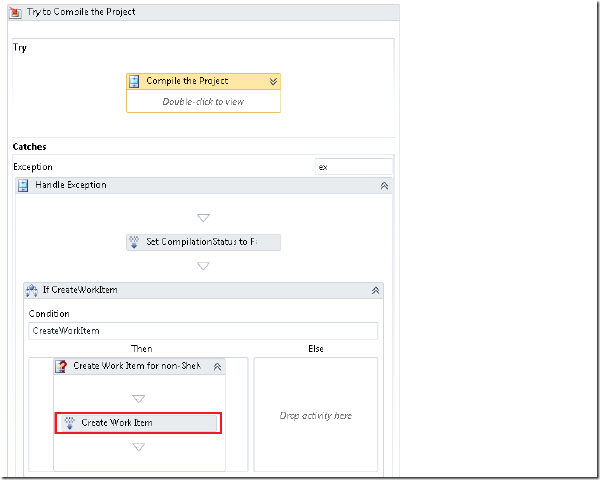
The default behaviour in TFS Team Build (all versions) is to create a bug work item when a build fails. This main benefit of this is that you get a work item for something that needs to be done, namely to fix the build!. When the developer responsible for the build failure has fixed the problem, he/she can associated that check-in with the work item that was created from the previous build failure.
*** UPDATE 2010-08-17 ** Several people have asked me for a complete sample application, so I have put this together and it is available here: http://cid-ee034c9f620cd58d.office.live.com/self.aspx/BlogSamples/CreateTFSBuildDefinition.zip
In this post I will show how to create a new build definition in TFS 2010 using the TFS API. When creating a build definition manually, using Team Explorer, the necessary steps are lined out in the New Build Definition Wizard:
image
When embracing Team Build 2010, you typically want to define several different build process templates for different scenarios. Common examples here are CI builds, QA builds and release builds. For example, in a contiuous build you often have no interest in publishing to the symbol store, you might or might not want to associate changesets and work items etc. The build server is often heavily occupied as it is, so you don’t want to have it doing more that necessary. Try to define a set of build process templates that are used across your company. In previous versions of TFS Team Build, there was no easy way to do this. But in TFS 2010 it is very easy so there is no excuse to not do it! :-)
In TFS Team Build (all versions), each build is associated with changesets and work items. To determine which changesets that should be associated with the current build, Team Build finds the label of the “Last Good Build” an then aggregates all changesets up unitl the label for the current build. Basically this means that if your build is failing, every changeset that is checked in will be accumulated in this list until the build is successful.
In previous versions of TFS, you installed TFS Team Build on the build server and you got one build service agent. It was/is possible to start several build agents on the same server, but it is a bit of a mess. In addition, for each team project TFS 2008 build service can only execute one at a time (Note that builds from different team project can execute in parallell, a lot of people still don’t know this)
We are in the process of upgrading the entire company to TFS 2010 Beta 2, and in preparing for that we have done some test upgrades to make sure that all things work as expected after the upgrade. As expected, most issues that turned up had to do with builds. This is one of the areas that has changed the most compared to TFS 2008. I thought that I would use this post to run through some of the issues that we found.
Disclaimer: This blog post discusses features in the TFS 2010 Beta 1 release. Some of these features might be changed in the RTM release.
In TFS 2010, Microsoft has changed the build orchestration language in Team Build from MSBuild to Windows Workflow 4.0. Aaron Hallberg has written a post on how to implement a custom workflow activity using either the workflow designer or using a code activity that composes an activity. In this post, I will show how to implement a “pure” code activity, i.e. no workflow elements,and how to add this activity to a build process definition. Note, this is still Beta 1, and some things will definitely change when Beta2 and RTM arrives but this will get you started with customizing your builds in TFS 2010.
A really cool new feature in VSTS 2010 is Test Impact Analysis which let developers view what tests that are affected by the current code changes. Pieter Gheysens wrote a blog post on how to set this up in the CTP, but things have changed a bit in Beta 1 so I thought that I would show how it is done. Since it still is a bit unintuitive to enable it, it might change once again in the RTM. The reason that it is a bit unintuitive to set it up, is because you need to have the following things:
There are some changes and improvements in the area of executing unit tests in Team Build 2010. Mostly the changes make it easier to define which unit tests you want to execute as part of the build. In this post I will go through the different options that you have when it comes to running unit tests and enabling code coverage.
To configure test settings for a Team Build, you select Edit Build Definition in Team Explorer, and then go to the Build Process tab. In the Build process parameters box there is a section for the testing parameters. To change the parameters, just edit them and hit the save button. There is no need to check anything in or out to change the parameters. Only changes to the build process require you to check in the build process file (.xaml)
*Disclaimer: This blog post discusses features in the TFS 2010 Beta 1 release. Some of these features might be changed in the RTM release. *
In my last post I talked about the new major features of Team Build in TFS 2010. This time, I will go into more detail on how you work with build definitions. In TFS 2010, the whole build process is now implemented on top of Windows Workflow Foundation 4.0 (WF4). This means that everything that has to do with creating and customizing builds in TFS 2010 is now done using a workflow designer UI. This means that you no longer have to remember all the different MSBuild targets when you want to insert some custom logic in your build. On the other hand, you obviously need to understand how a default team build process is implemented, which activities does what, what WF properties and variables that exist. And eventually you might also have to learn how to implement custom workflow activites when you need more functionality than what is included in the standard team build activities.
VSTS 2010 Beta 1 is finally available. Beta 1 is a huge release a contains tons of new functionality in almost all areas of Team System. We at Osiris Data have been using Team System since the first beta, and we also help our customers how to adopt TFS in their organization. So for us VSTS 2010 is a very exciting release.
I am planning to post several blog entries about the new functionality of VSTS 2010, in particular I will focus on Team Foundation Server (TFS) and Team Build. I have been working a lot with Team Build 2005 and 2008 and have been looking forward to the 2010 release. VSTS 2008 was a minor release for TFS, so a lot of missing features and change requests haven’t been implemented until now.
A very common question from people is how to handle dependencies between projects/applications/team projects in TFS source control. A typical scenario is that you a common library/framework tucked away nicely somewhere in TFS source control, and now you have some applications that, in some way, needs to reference this project.
My colleague Terje has written an article on what he calls “Subsystem branching”, in which he talks about different ways to organize your source code in order to solve the above problem. Ther article can be found here: http://geekswithblogs.net/terje/archive/2008/11/02/article-on-subsystem-branching.aspx